
InterCLASS® Advance
Available in version 1.2 and later
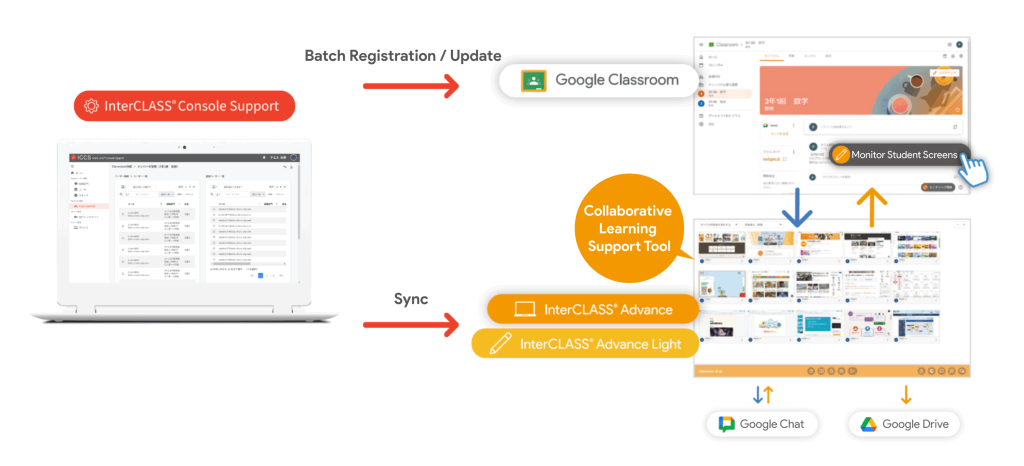
Enhanced integration with Google Workspace – Start classes directly from Google Classroom
InterCLASS®Advance / Advance Light has been enhanced to integrate with Google Classroom, allowing users to start a class with a single click from within Google Classroom. This streamlines the synchronization of class and students information, reducing the burden of class preparation and making class management more efficient. By linking with InterCLASS® Console Support, centralized class management is also possible. It also opens up more ways to teach, including screen monitoring, checking students’ browsing activity, and using Google Chat and Google Drive directly from Google Classroom.
Available in version 1.2 and later
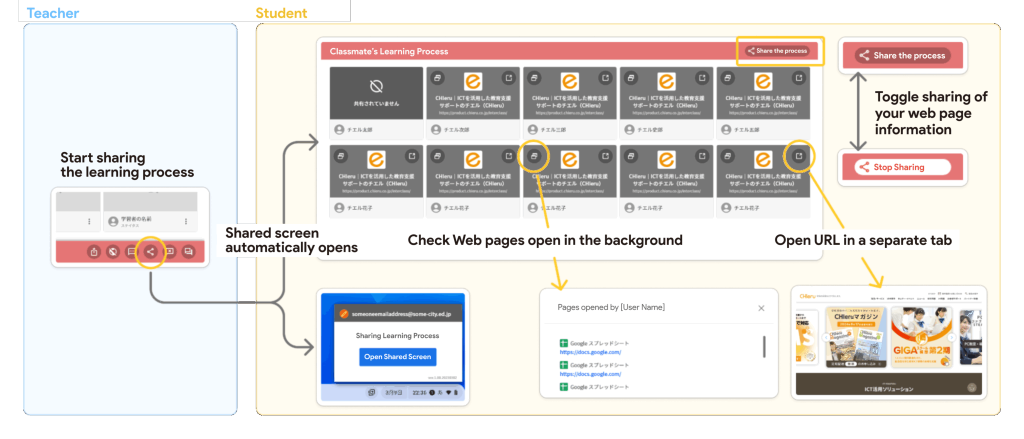
Peer Reference: Support Independent and Collaborative Learning by Sharing What Students Are Viewing
InterCLASS® Advance/ Advance Light is now equipped with a peer reference function that allows students to share their learning processes. During class, at the teacher’s instruction, students can share the web pages they are viewing with each other and refer to their classmates’ learning progress. This helps students gain new insights and discoveries, and those who are struggling can make progress with their learning by referring to others, supporting the promotion of independent learning and improving the quality of learning.
Available in version 1.2 and later
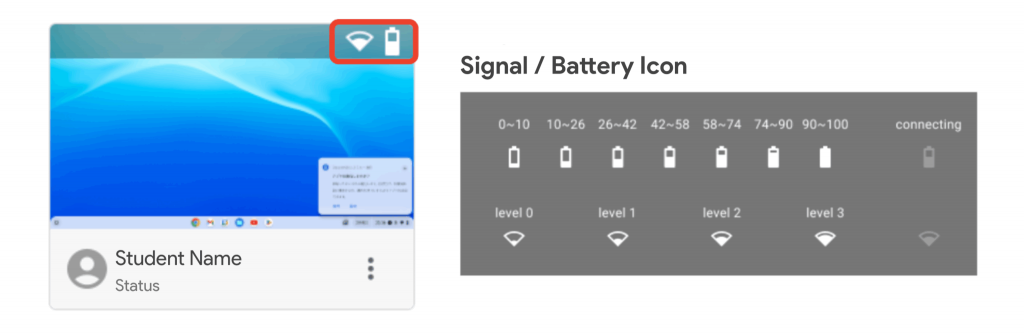
See Battery Levels and Connection Status at a Glance
The students screen monitoring function has been enhanced to display the battery levels and communication status of students devices with icons. This prevents class interruptions due to dead batteries as a result of forgetting to charge or poor communication, creating an environment where students can concentrate on the class with peace of mind. This can also be used to check the wireless LAN environment outside the classroom, enabling stable classes regardless of location.
Available in version 1.2 and later/p>
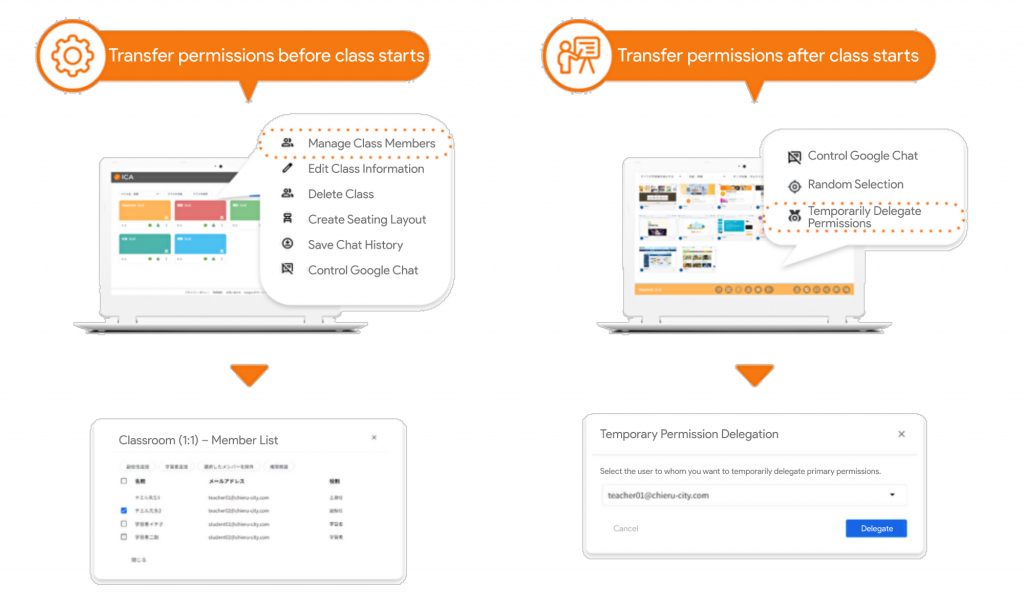
Transfer class authority with one click! A new function to smoothly hand over classes when the main teacher is absent.
Previously, handing over a class in InterCLASS® Advance/Advance Light was difficult when the lead teacher was suddenly absent or during team teaching. To solve this, a function has been implemented that allows the lead teacher to temporarily transfer their authority to a co-teacher. This function enables a smooth handover of the class to the co-teacher even when the lead teacher is suddenly unwell or temporarily leaves the classroom. This ensures students don’t miss out on learning and supports smooth class management without confusion in times of need.
Available in version 1.2 and laterr
A must-see for teachers! Adding useful new features that expand the possibilities of teaching and help with lessons.
We’ve added a set of handy new features that solve everyday classroom challenges, including a random presenter picker to increase students concentration and an audio transmission feature that allows instructions to be given outside the classroom. These features reduce the burden on teachers and deepen students learning, providing a better learning environment for both teachers and students.
Make Presentations More Engaging with the Random Picker
Teachers can randomly select and decide a presenter from the entire class or specific students. It is also possible to exclude students who have already presented from the lottery, encouraging each students to actively participate in the class. Furthermore, the screen of the selected presenter can be quickly shared with the entire class with a single click, allowing everyone to share the presentation content and deepen their understanding.
Broadcast Your Voice–Teachers can now stream microphone audio along with their screen using the existing screen-sharing feature.
Using the existing “screen transmission” function, it is now possible to also transmit microphone audio. It has become easier to give direct instructions and calls to students learning outside the classroom using the teacher’s voice, and students can act smoothly without missing the teacher’s voice, leading to more efficient class management.
Get in touch
Contact
Contact us for product details, demos, or partnership inquiries.
By Phone
+81-3-6712-9721Contact Form
Contact